I’ve been taking care of long-overdue maintenance stuff that certainly wasn’t going to get done after an extra book pushes it further down the priority list. I decided to have a no-creative-work week and get all the housekeeping out of the way so it’s no longer clawing at the fence of the enclosure where all my undone tasks go to not-quite-die.
First, a moment of silence for my hours of unpaid labor to get this site optimized.[efn_note]My kingdom for a single optimization plugin that covers absolutely everything because configuring half a dozen to work together peaceably is not a good time.[/efn_note]

Speed (the main consideration of the Performance score) fluctuates some due to circumstances beyond my control but usually hovers somewhere in the green zone. I’m down to only one ding on the accessibility rating, and I put in an update request with the theme developer for that because the way they set things up, I can’t find where in the code to insert the prescribed fix (and maximum accessibility should be baked into all their themes anyway!). So if you notice any of the changes around here, they were all efforts to be a more responsible site owner.
Next, I wanted to get my only-ever-self-pubbed books into my Ko-Fi store. I could have simply uploaded the files that are being sold elsewhere, and though there were definitely times I wished I’d done that, I’m ultimately glad I didn’t. What started out as a “this is a good time to fix that one typo in every book that sneaks past even the most meticulous proofreader” project[efn_note]During the search-and-destroy for typos, formatting weirdness, and regrettable phrasing, I ended up reading all three of my self-pubbed contemporary romances in a row, which I’ve never done before, and it was glaringly obvious I wrote three books in a row in which characters blame themselves for terrible things someone else did. Whoadamn is that telling! Perhaps that creative cycle reached the end because Gin said outright “It wasn’t my fault” and I just had nothing else to say after that.[/efn_note] evolved into a “why is this file size 12 times bigger than books that are twice as long” adventure.
Shout out here to the Smashwords Style Guide and Meatgrinder, which have been giving me tidy little epubs for a decade or so, and Sigil, which lets me clean up any glitches. Everything else[efn_note]Everything else that’s FREE. I’m sure Vellum is amazing if you’re made of money.[/efn_note] has given me ugly, bloated, and/or broken results. I have a bad feeling the Meatgrinder is going to be a casualty of the Smashwords/D2D merger because D2D’s converter is “easier,” so it’s a good thing I got a deep dive into Sigil last week. I can probably build an epub from scratch now if absolutely necessary to get what I want.
To be clear, before I ever send a book out into the wild, I sideload it onto a Kobo ereader that I have solely for the purpose of testing epub files. I read it cover to cover to make sure it looks okay and all the internal navigation is functional. Also, the sellers run bot checks and won’t let a book through if it’s broken. So this monster was technically okay on the user side. But I opened the file in Sigil and screamed. This other method didn’t use a stylesheet (HOW? WHY?), so every single paragraph included the full code for its attributes, which is how it exploded to 12 times more text! I should have looked at what the download fee was on Amazon[efn_note]For those who don’t know, Amazon charges self-publishers who choose the 70% royalty rate a “download fee” based on file size every time a book is sold. (In fact, books with a lot of images in them are often more profitable if you take the 35% royalty rate to get out of the download fee that devours your money.) NOBODY ELSE charges a “download fee.” It’s just something Amazon does because they can. Have I mentioned you can buy ebooks anywhere now and use “Send to Kindle” to convert epubs if you’re really married to your Kindle but sick of Amazon’s practices?[/efn_note] before I uploaded the new version, but it’s 7 cents now, and at 12 times the size… Ahem. Maybe it’s a good thing it barely sold on Amazon.
Lesson learned: Open everything in Sigil before uploading to make sure it doesn’t evoke horror because a use test isn’t good enough anymore.
Sigh. Anyway, I uploaded updated files everywhere.[efn_note]Apparently this reset a Hoopla submission that’s been in “slow processing times” limbo since January. I went with D2D for the most recent book specifically for Hoopla, so it’s groovy how that never materializes.[/efn_note] This is probably the biggest point in favor of using an aggregate distributor (for me).[efn_note]Close second: If there’s a way to get into library distributors (Overdrive, Baker & Taylor, Hoopla, etc.) directly, I don’t know it. I don’t get a ton of library action, but it’s the principle of the thing. ETA: I’m doing something direct with Kobo now, and they also go to Overdrive, but if you want the broadest library coverage, an aggregator is still the way to go.[/efn_note] If I was direct with B&N, Kobo, and Apple, that would have been so much more hassle than letting the aggregator send the update to them for me. Yes, there are perfectly good reasons to go through retailers directly (keep more money, access to in-house promo opportunities, more control of the listing), but I am very much in favor of hassle reduction—not enough to put all my eggs in Amazon’s basket and do one-and-done, but also happy to not make the absolute maximum amount of work for myself. Ko-Fi, Google, Amazon, and an aggregator are the limit of fussing I’m willing to do.
I also prettified my Ko-Fi shop while I was at it. PRO TIP: Do all your experimentation before you have any followers because every single time you update something, it goes into their newsfeed! This is a nightmare for me because I like to tweak things, but it is what it is.
Previously, I had the rectangular jpeg of each book cover as the only image, but since the image displayed in the storefront is square, they’d get cropped, which doesn’t show a cover to its best advantage. I could have fixed the problem by dropping the cover flat onto a square white background, but what a wasted opportunity.
DIY Book Design’s 3D mockup maker makes it easy to drop a book cover into a tablet (or phone or paper book, depending on the template selected). I have EBOOK in the title of the listing, but now it’s reemphasized in the image that this is a digital purchase.
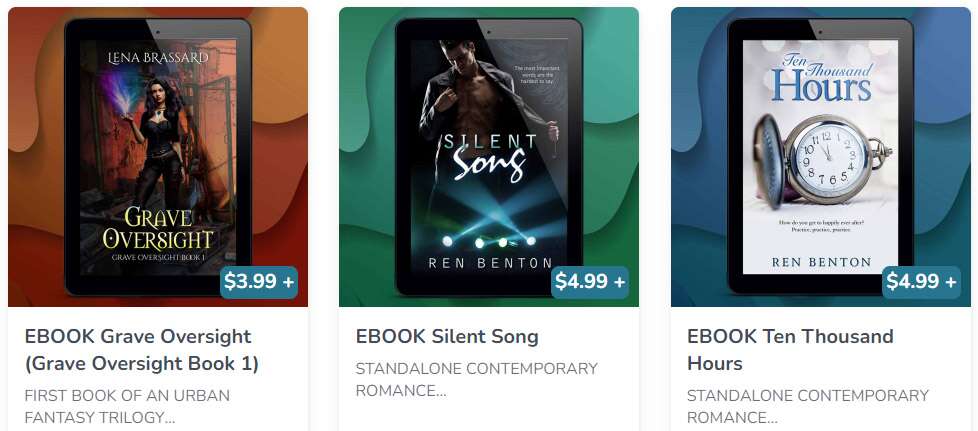
I have four unrelated books that don’t look much alike, so there’s no unifying theme in the covers themselves. I tested them all on the same neutral, square background image, which was unifying but boring. However, if I put the same wavy abstract background behind them and adjust the hue to coordinate with the colors in the cover, there’s consistency and the page is colorful.
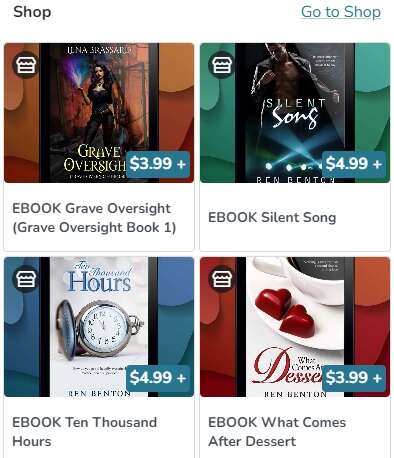
Where they’re displayed on the main page, the images get a little bit cropped, but because the background image and tablet add a bit of dead space top and bottom, everything on the covers themselves remains visible. For now, I’m happy when I look at it, so no more deluge of “Lena Brassard updated her Ko-Fi shop a million times” notices.
Now all that stuff has been snipped off the list, burned, and the ashes scattered to the four winds. This week, it’s back to the creative side of the business.